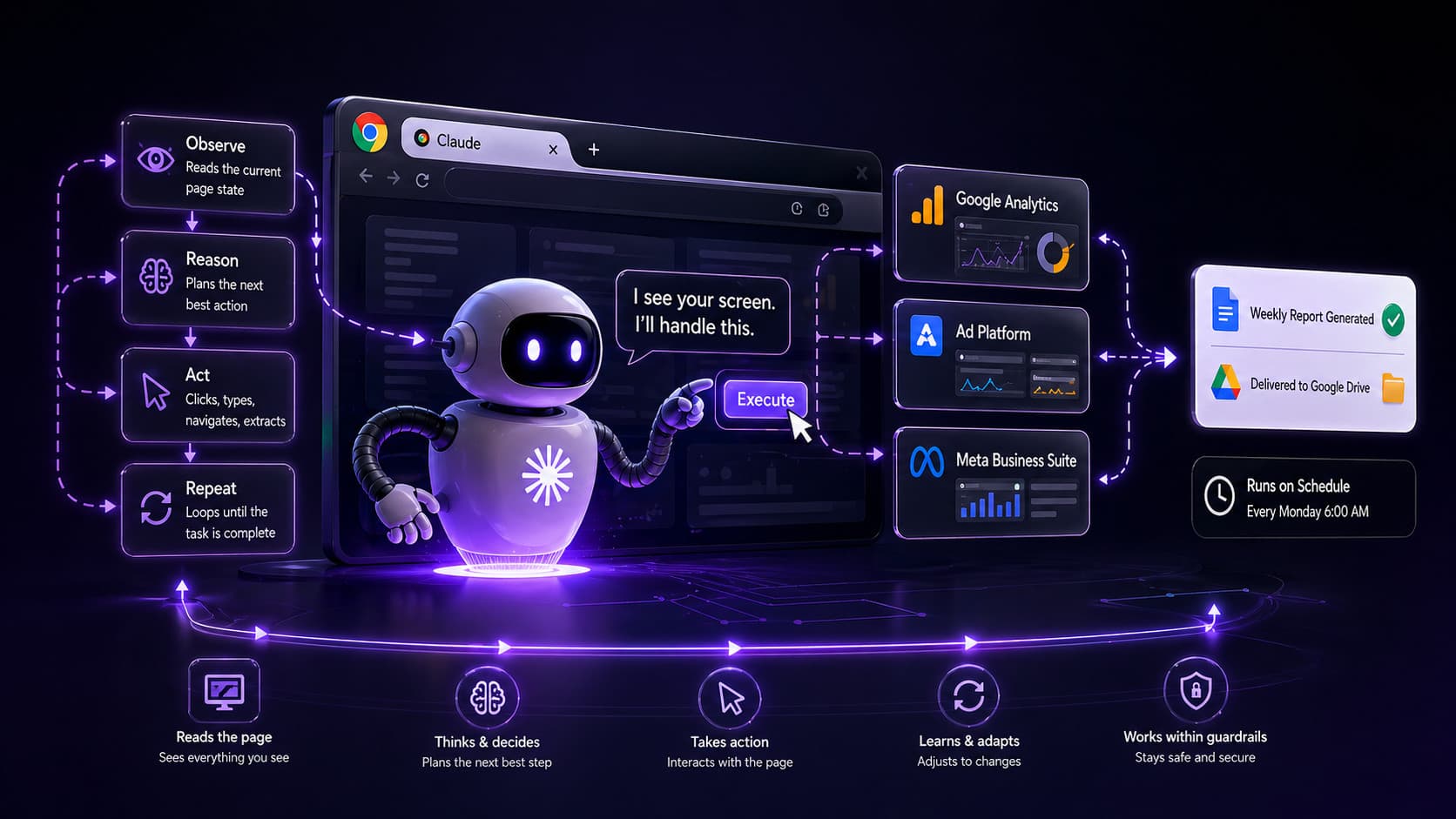
The Claude Chrome extension turns AI from a conversational tool into a browser agent that navigates pages, executes workflows, and handles the repetitive web tasks you've been doing by hand.
Every Monday morning for six months, a solo operator sits down with three browser tabs open: Google Analytics, a third-party ad platform, and a Meta Business Suite account. She copies numbers into a spreadsheet. Pastes them into a reporting doc. Formats the table. Sends it. The whole thing takes forty minutes and requires zero judgment. She has wondered, more than once, whether this is actually her job.
The gap between asking and doing
Claude in a chat window is excellent at reasoning through problems, writing, and answering questions. It is not capable of opening a browser tab. It cannot navigate to your analytics dashboard, read the numbers, or copy them anywhere. The interface is conversational by design, and conversations do not execute tasks.
The Claude Chrome extension changes that boundary. It gives Claude access to what is on your screen and the ability to take action in your browser: clicking, typing, navigating, and reading page content. This moves Claude from a system you query to a system that operates.
How the extension actually works
When you install the Claude Chrome extension and connect it to your Claude account, you gain two capabilities that do not exist in the standard chat interface: the ability to record a workflow and the ability to schedule one.
Recording works by demonstration. You perform the task yourself while Claude observes through the extension. It maps the sequence of actions: which URL you navigate to, which elements you interact with, what data you extract, where it goes. That recording becomes a replayable workflow. Claude does not follow a rigid script. It reasons about each step using current page state, which means it can handle modest variation in page layouts without breaking.
Scheduling closes the loop. Once a workflow is recorded and verified, you can set it to run on a recurring schedule without manual triggering. That forty-minute Monday morning analytics pull becomes something that runs at 6 a.m. and drops a completed doc in a shared Google Drive folder before anyone opens their laptop.
Inbox triage follows a similar pattern. Claude can read your Gmail inbox, apply rules you define, draft responses to specific message types, and flag items that need human attention. The behavior is not magic. It is a structured set of instructions applied to page content at a scheduled time. You define what "needs human attention" means. Claude applies that definition at scale.
The technical constraint worth knowing: Claude reads page content within a context window. Long pages with heavy JavaScript rendering can hit limits. If a dashboard requires scrolling through hundreds of rows, the workflow may need to be broken into segments. Test before you schedule.
What each approach costs you
Browser automation via Claude is faster to set up than writing a Selenium script or building a proper API integration. That speed has a real cost: fragility. When a site redesigns its navigation, renames a button, or moves a data element to a different DOM position, your workflow breaks. A Python script with proper selectors breaks in the same way, but at least it fails with an explicit error. Claude's agent loop may misidentify an element, proceed anyway, and produce output that looks correct but is not.
Scheduling solves the "I have to remember to do this" problem but creates a new one: unmonitored execution. A workflow running at 6 a.m. when no one is watching can silently produce wrong output for weeks. Build in a verification step before you trust any scheduled workflow fully. A spot check works. So does a confirmation email, or a row count check on the output file.
Prompt injection is the risk most people skip over until it burns them. A malicious website can embed hidden text in a page, formatted to look like Claude directives, and attempt to hijack the agent mid-task. Claude has defenses against this, but they are not absolute. On pages you control or trust (your own Google Analytics, your own Drive, your own inbox), the risk is low. On pages from third-party vendors, public forums, or customer-submitted content, the risk is real. Do not run Claude browser agents on untrusted pages with access to sensitive accounts.
The third cost is cognitive: setup time is not zero. Recording a workflow cleanly, verifying it runs correctly on at least three cycles, and setting up the right monitoring takes a few hours for a well-defined task. That is still far less than six months of Monday mornings, but it is not instant.
Where to start
Pick one workflow that runs at least weekly, requires no judgment calls, and lives entirely on pages you control. The analytics pull is a good candidate. So is a recurring document you create in Google Drive from the same data sources each week. Inbox triage works, but start with a single category of message with a clear, consistent response before scaling to full inbox management.
Record the workflow yourself before you let Claude run it unsupervised. Watch the playback. Check the output against your manual version. Run it three times manually before you schedule it. That verification step is where most automation problems surface, and it is far easier to fix a workflow before it runs unattended at 6 a.m. than after.
Once you have one workflow running cleanly for two weeks, the pattern is clear enough to apply to the next one. The extension does not replace judgment. It removes the tasks that never required any.