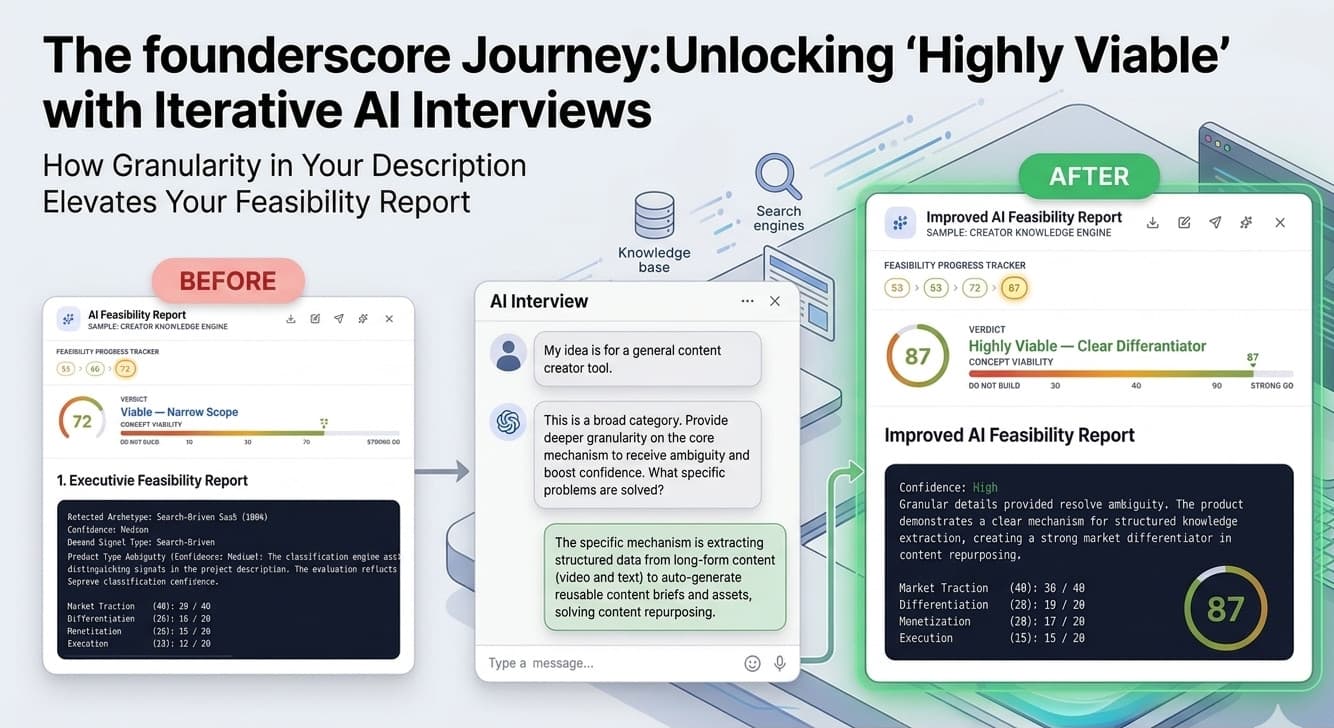
Most founders who act on their ideas do so on instinct. They invest months of development and thousands of dollars before ever finding out whether the market agrees with them. Many launch into the void only to discover that nobody wants to pay for what they built.
The founderscore Feasibility Report is designed to surface that answer before any of that happens. This article walks through the full process: the AI interview, the 10-phase research pipeline, the scored report, and the improvement cycle that lets you iterate toward a stronger position.
Starting the Interview
Once your project has a description, click the Sparkles icon on its dashboard row to begin. The icon appears gold for projects that have not yet been analyzed and shifts to green once a report exists.
The process starts with a ready-check rather than jumping straight into questions. The AI reads your full project description, identifies the three or four highest-priority information gaps specific to your idea, and presents them to you before the interview begins. This is not a generic checklist. The gaps it surfaces are specific to your project. You confirm you are ready and the interview begins.
The AI Interview
The interview runs up to 20 adaptive questions covering 13 knowledge areas, depending on the depth of your current project description. These include your target customer persona, current market alternatives, structural differentiation, business model and pricing, geographic scope, technical complexity, build approach, regulatory and compliance exposure, category positioning, founder domain expertise, existing audience and distribution, and current traction signals.
The AI does not fire questions mechanically. Each response after the first begins with a brief acknowledgment of what you just said: confirming a takeaway, flagging a concern, or noting something worth exploring. That reaction comes before the next question. The result is a conversation that moves naturally rather than feeling like an intake form.
The AI also tracks what you have already covered. If you mention your pricing model while answering a different question, it notes it and skips the dedicated pricing question later. The interview is a knowledge map, not a fixed script.
If you answer “I don’t know” on a question, the AI does not leave a blank that will work against your score. It analyzes the context of what you have shared and offers two or three concrete, project-specific options to choose from. For a B2B productivity tool, that might mean suggesting a per-seat subscription, usage-based pricing, or a flat-fee team license. You choose one and the interview continues.
At question 20, the AI offers an optional five-question extension if there are meaningful gaps remaining. The maximum is 25 questions total.
The Addendum Review
When the interview ends, a synthesis process extracts the concrete details from the conversation and transforms them into a clean, structured addendum. You are presented with a review screen showing the full synthesized addendum in an editable format.
You have two choices: Approve and Generate, which appends the addendum to your project description and starts the pipeline, or Skip and Generate, which starts the pipeline using what you already have without appending anything. Approving is the recommended path. The addendum captures specific answers from the interview that strengthen the research pipeline’s inputs.
The 10-Phase Research Pipeline
After the addendum step, the generation pipeline begins. A live progress tracker shows each phase moving from waiting to active to finished in real time. Behind the scenes, specialized AI agents run parallel and sequential research across 10 phases.
Phase 0: Archetype Classification. Before any other research runs, the system classifies your idea across 10 product archetypes: Search-Driven SaaS, Workflow/Productivity SaaS, Marketplace, Community Platform, Network Platform, Content Platform, Infrastructure/API Tool, Mobile Consumer App, Hardware/IoT, and Data/AI Platform. This classification is not cosmetic. It determines the scoring weights applied to every dimension of your idea, and it changes what the research pipeline looks for.
A marketplace is scored differently than a productivity SaaS because they face fundamentally different market dynamics. For a Search-Driven SaaS, Market Traction carries 40% of the total weight because search demand is the primary signal. For a Data/AI Platform, Differentiation carries 40% because the market is saturated and the only path to viability is a meaningful moat.
If the classifier cannot determine your archetype with high confidence, a Product Type Ambiguity block appears in the report explaining the competing classifications and their probabilities. If confidence is very low, a 10% penalty is applied to the final score. The system is telling you something important: if it cannot classify your idea clearly, neither can your market.
Phases 1 through 9 cover brand and naming viability, target audience research, competitive landscape analysis, IP and regulatory exposure, market demand and TAM assessment, feature gap analysis, pricing strategy and unit economics, build feasibility and execution risk, and final report compilation.
The research draws on real-time web data from Google, Reddit, product review platforms, patent databases, and startup graveyard sources. In the competitive landscape phase, the system specifically looks for negative reviews of your identified competitors to extract complaints about missing features or persistent usability issues. If your idea addresses problems that competitors’ paying customers are actively frustrated by, that is identified as a viable competitive wedge.
The pipeline concludes with a Score Calibration step that cross-validates all sub-scores for anomalies before the final report is compiled and delivered.
## Reading Your Report
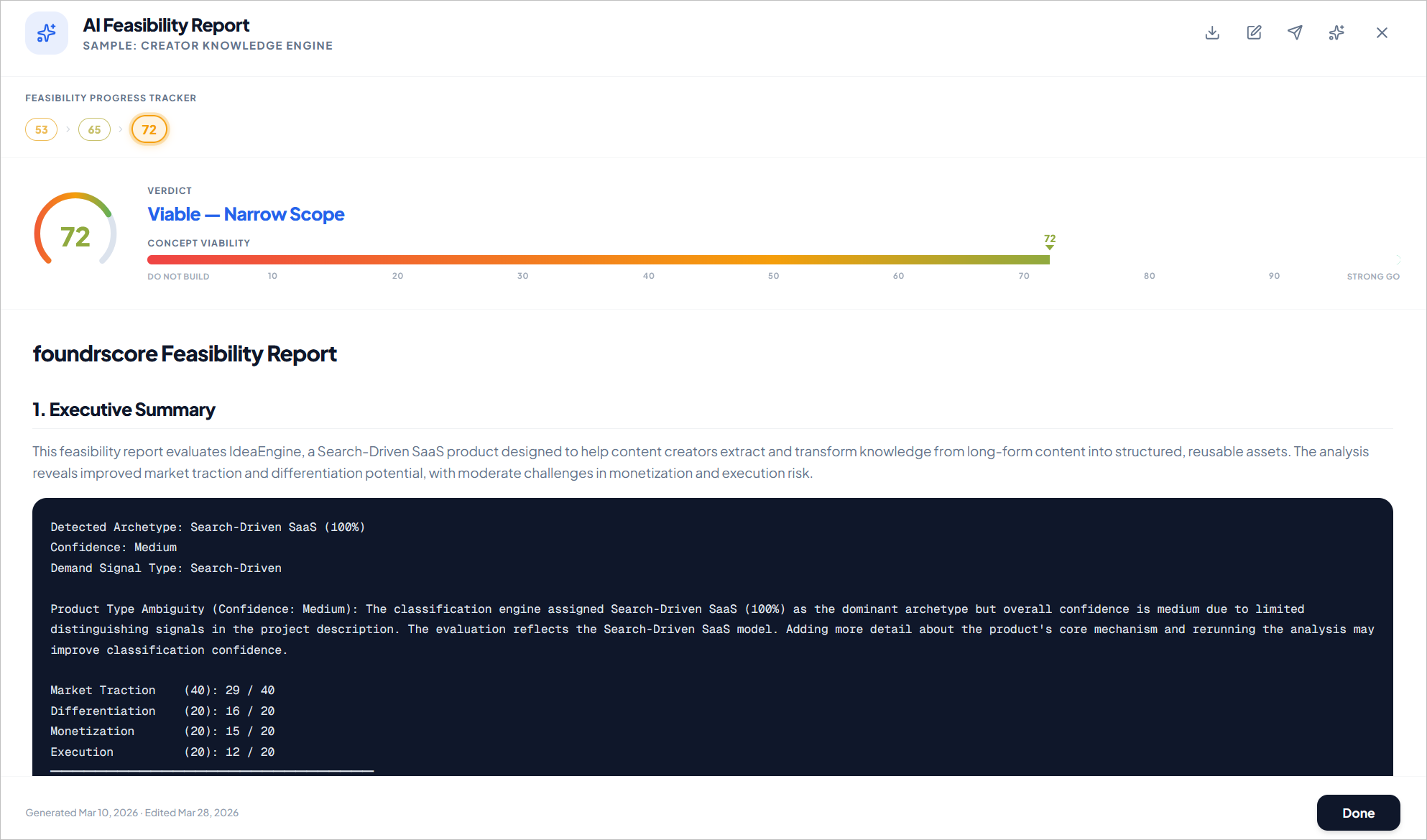
The report opens with an animated score gauge that fills from red through gold to green, stopping at your score. Below it, a Concept Viability bar shows your position across the full 0 to 100 range with threshold markers at each verdict boundary. The score and verdict are color-coded to the band they fall in.
The report itself includes 12 sections: Executive Summary, Product Archetype and Classification, Target Audience and Problem Validation, Competitive Landscape and Differentiation, IP/Regulatory and Compliance, Market Demand and TAM Assessment, Feature Gap Analysis, Pricing Strategy and Unit Economics, Build Complexity and Execution Risk, Founder Fit and Domain Expertise, Score Breakdown and Verdict, and the Score Improvement Roadmap.
The Score Breakdown in Section 11 shows your four dimension scores and their archetype-weighted contributions to the final number. This is where you can see exactly which dimensions are pulling your score down and by how much.
The five verdict tiers:
-
Strong Build Candidate (80 to 100)
-
Viable, Narrow Scope Required (70 to 79)
-
Risky, Only Build With Clear Advantage (60 to 69)
-
Weak Traction, Reconsider (50 to 59)
-
Do Not Build (below 50)
A score in the 40s is not a failure. It is an early data point. The difference between a 45 learned before you build and a 45 learned after six months of development is everything.
The Cold-Start Exception
If your idea is classified as a Marketplace, Community Platform, or Network Platform, the execution dimension is evaluated differently. For these archetypes, the primary risk is not building the product. It is acquiring enough users to make it work before it dies.
The system evaluates what it calls single-player mode: does the product deliver value to a single user before any network or community exists? A note-taking app works perfectly for one person. A marketplace with one seller has nothing to offer a buyer.
If your product has no single-player utility and your description does not include a credible plan for seeding initial users, the Cold-Start Feasibility sub-score will be very low. A score of 2 or below on this dimension caps your total score at 45 regardless of how strong your other signals are. This is a deliberate, structural constraint. The system is reflecting a real failure pattern that has killed many well-funded products.
Improving Your Score
Section 12 of every report is the Score Improvement Roadmap. It lists specific, actionable steps organized by dimension: what actions would most improve your Market Traction score, your Differentiation score, your Monetization score, and your Execution score. Each action comes with an expected point range if completed.
This is where the report becomes a working document rather than a final judgment.
After completing the recommended actions, you update your project description with the new information and click the green Sparkles icon to run an improvement interview. The AI reads your previous report, silently audits the Score Improvement Roadmap, and builds an interview of 5 to 10 targeted questions focused only on the gaps you had not yet fully addressed. It does not repeat ground already covered.
The improvement pipeline uses your previous report’s research as a stable evidence base rather than re-running web searches. This is intentional. It isolates the variable to your updated strategy, ensuring that score changes reflect what you have actually done rather than random fluctuations in search trends. Sub-scores are capped at a maximum change of plus or minus 3 points per improvement run, which prevents unjustified swings and enforces methodical progress.
Every report version is preserved in the Feasibility Progress Tracker, displayed as clickable badges ordered from oldest to newest. You can click any badge to view that version of the report in full. The improvement cycle is designed to repeat: act on the roadmap, deepen your description, run the improvement interview, watch the score move.
Sharing and Exporting
Once you have a report you are ready to share, the report view includes a Download button for Markdown or PDF export and a Share button that opens an email dialog. You can send the report directly to up to 20 recipients: co-founders, mentors, advisors, or potential investors. The PDF version includes your score, the verdict, and the full report content.
The edit button lets you annotate or refine the report text directly in the platform if you want to add context before sharing.
What Comes Next
A Feasibility Report gives you a scored, evidence-based answer to whether your idea has structural integrity. For founders whose score supports moving forward and who are seeking investment, the next step is the Pitch Paper: an investor-grade narrative document built from the same research, structured specifically for the fundraising conversation. That is the subject of the next article.
Ready to get your first score? founderscore offers a 7-day free trial with 3 credits included. One credit covers a complete Feasibility Report from interview through scored verdict. No long-term commitment required.