The architecture review is done. The project plan has a go-live date. The vendor has run three demos and everyone nodded along. Then someone in the room asks a quiet question: "Does anyone know if the team can actually use this?"
Silence.
That moment happens more often than it should. Technical migrations get weeks of scrutiny: integration testing, data validation, security reviews, rollback plans. The people side of the same project gets a training session two weeks before launch. Sometimes one session. Sometimes a recorded video and a PDF.
The result is predictable. Go-live happens on schedule. Then the support tickets start.
The gap that shows up too late
Skills gaps during migrations are not random. They follow a pattern. The new platform is live, the old one is gone or locked, and the team is operating in a system they do not yet understand at the level the work requires.
This is expensive to fix after the fact. You are training people under production pressure, with real customers affected and real deadlines in play. The cost per training hour goes up, retention goes down, and the people closest to the work get stretched thin covering for colleagues still catching up.
A readiness check will not prevent all of this. But it tells you where the risk is concentrated before you commit to a go-live date. That is the point.
What a readiness check actually measures
It is not a training needs analysis and it is not a satisfaction survey. It is a risk assessment. You are trying to answer three questions before cutover.
First: can each role do the specific tasks the new system requires of them? Not general computer literacy. Not familiarity with the vendor category. The actual tasks. Can the accounts payable team process an invoice in the new platform? Can the warehouse team complete a receiving transaction? Can the operations manager pull the reports she needs to run the Monday standup?
Second: do people understand what is changing in their process, not just what is changing in the software? A new system often rewires how work flows between people. Approvals move. Handoffs change. Some things that used to require a phone call now happen automatically. Some things that used to happen automatically now require a deliberate step. If people understand the software but not the process change, they improvise. Improvisation creates errors.
Third: can people operate without help? There is a real difference between a team that knows the system and a team that can use it independently when the implementation consultant is no longer on-site. That gap shows up fast.
How to run the check
The readiness check happens in two stages: a structured observation and a gap scoring session.
For the structured observation, pull a representative from each affected role and have them walk through their top five to eight job tasks in the new system. Not a demo. Not a walkthrough with prompts. They drive. You watch. You are looking for hesitation, workarounds, incorrect sequences, and tasks they skip or cannot complete.
This does not need to be a formal assessment with rubrics and proctors. A one-hour session per role group with someone taking notes is enough. What you are capturing is where people stop and what they do when they get stuck.
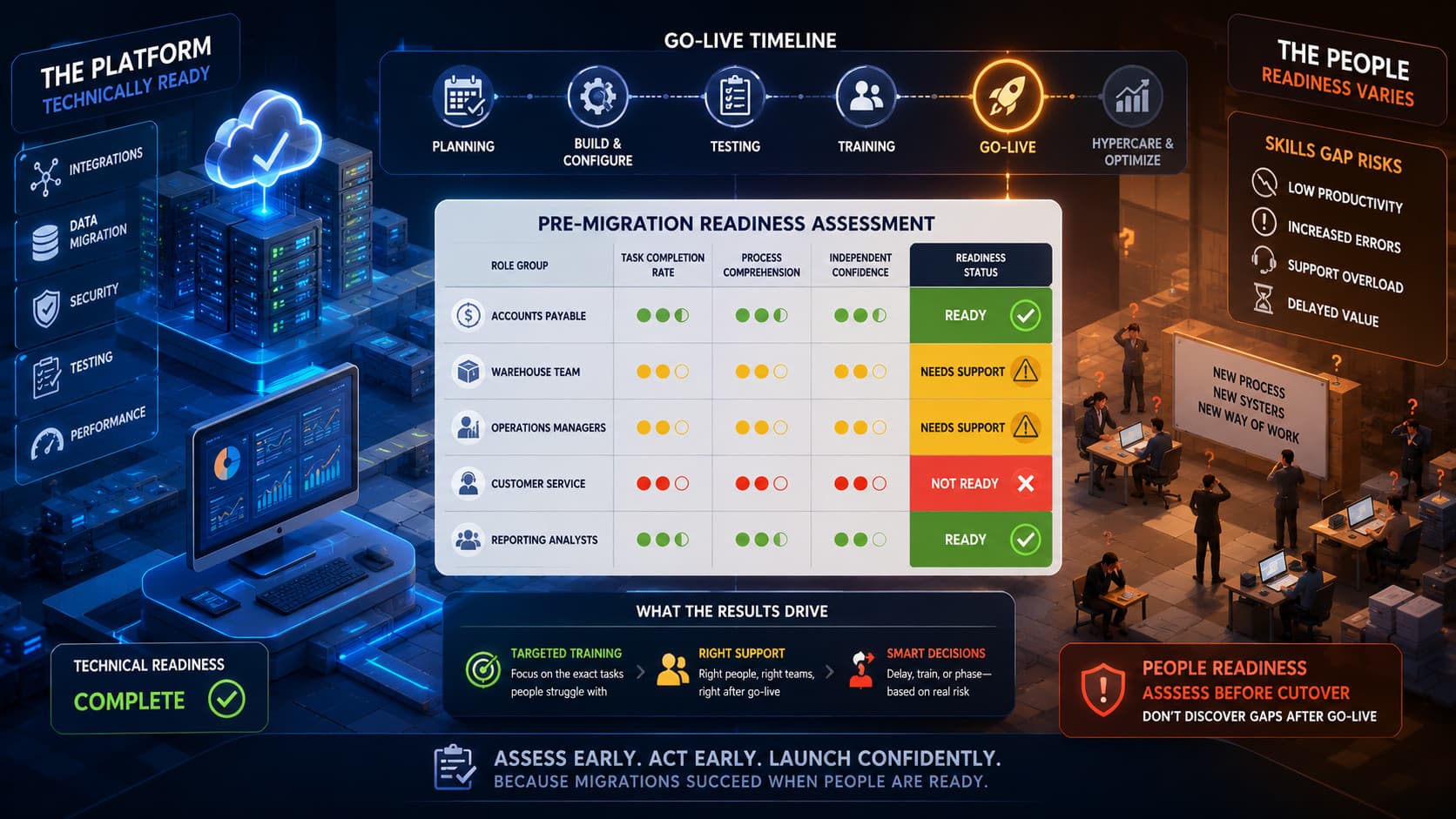
For the gap scoring session, take those observations and score each role group on three dimensions: task completion rate, process comprehension, and independent confidence. A simple three-point scale works fine. Green means ready to go live. Yellow means needs targeted support before or immediately after cutover. Red means not ready and go-live creates unacceptable risk for that role.
The scoring is not about individual performance. It is about whether the role group as a whole can carry the workload from day one.
What to do with the results
Most readiness checks surface a mix of yellow and red areas, rarely uniform green across all roles. That is normal. The goal is not a perfect score before launch. The goal is making an informed decision with the full picture in front of you.
Yellow roles can often go live on schedule with targeted support baked into the first two weeks. That means a specific person assigned to each team to answer questions, a short reference document covering the three or four tasks people got stuck on, and a daily fifteen-minute check-in during week one.
Red roles are a harder conversation. The options are: delay go-live for those functions, run a focused skill-building sprint in the two weeks before launch, or phase the migration so red roles stay on the old system longer while yellow and green roles go first. None of these options are free. Each carries a cost and a risk. The readiness check gives you the information to choose the right one instead of discovering the problem after go-live.
The instinct in most migrations is to hold the date. Dates have stakeholder commitments attached. They get treated as fixed. But a three-week delay to close a red-zone skills gap is a much smaller problem than six months of degraded operations and a damaged relationship with the team that had to absorb the consequences.
The step most teams skip
Run the readiness check before you schedule the first training session. Not after training. Before.
The readiness check tells you what training to build. It shows you which roles need depth on which tasks. It separates the teams that need a refresher from the teams that need a full skills sprint. Without it, you are guessing at the training design, which means you are probably covering the wrong things in the wrong order for the wrong audience.
Map the five to eight critical tasks for each affected role. Run a one-hour observation session with a representative from each group. Score task completion, process comprehension, and independent confidence. Use the results to set your training design, your go-live conditions, and your post-launch support plan.
That sequence takes two to three weeks before your training build starts. It saves considerably more time on the back end.