Six weeks into a cloud migration, the infrastructure team is running new and old environments simultaneously. The Azure portal is live. The on-prem servers are still handling production traffic. And three engineers are learning how to write Terraform configurations from YouTube videos they watch after midnight because nobody scheduled time to train them before the project started.
This is not a skills gap. It is a sequencing problem.
The Training Gets Scheduled Last
Most organizations treat cloud migration training as a post-project event. The reasoning feels logical: why train people on tools they aren't using yet? So training gets queued behind procurement, behind architecture decisions, behind the first wave of workload moves. By the time the calendar slots open up, the team is already in the middle of the migration and has no bandwidth to absorb anything new.
The result is predictable. Engineers learn by doing in production. Mistakes that a day of structured training would have prevented take hours to diagnose and fix. The project timeline stretches. Leadership notices the delays but not the cause.
The harder problem is that cloud migration is not a single skill set. It has phases, and each phase demands different knowledge from different people. A generic "Introduction to AWS" course does not prepare a database administrator for the specific decisions they will face during a lift-and-shift of a legacy SQL environment. A two-day Azure fundamentals workshop does not tell a network engineer how to configure ExpressRoute for their specific hybrid architecture. Generic training lands at the wrong time, teaches the wrong things, and gets blamed for being ineffective when the real failure was in how it was positioned within the project.
What Each Phase Actually Demands
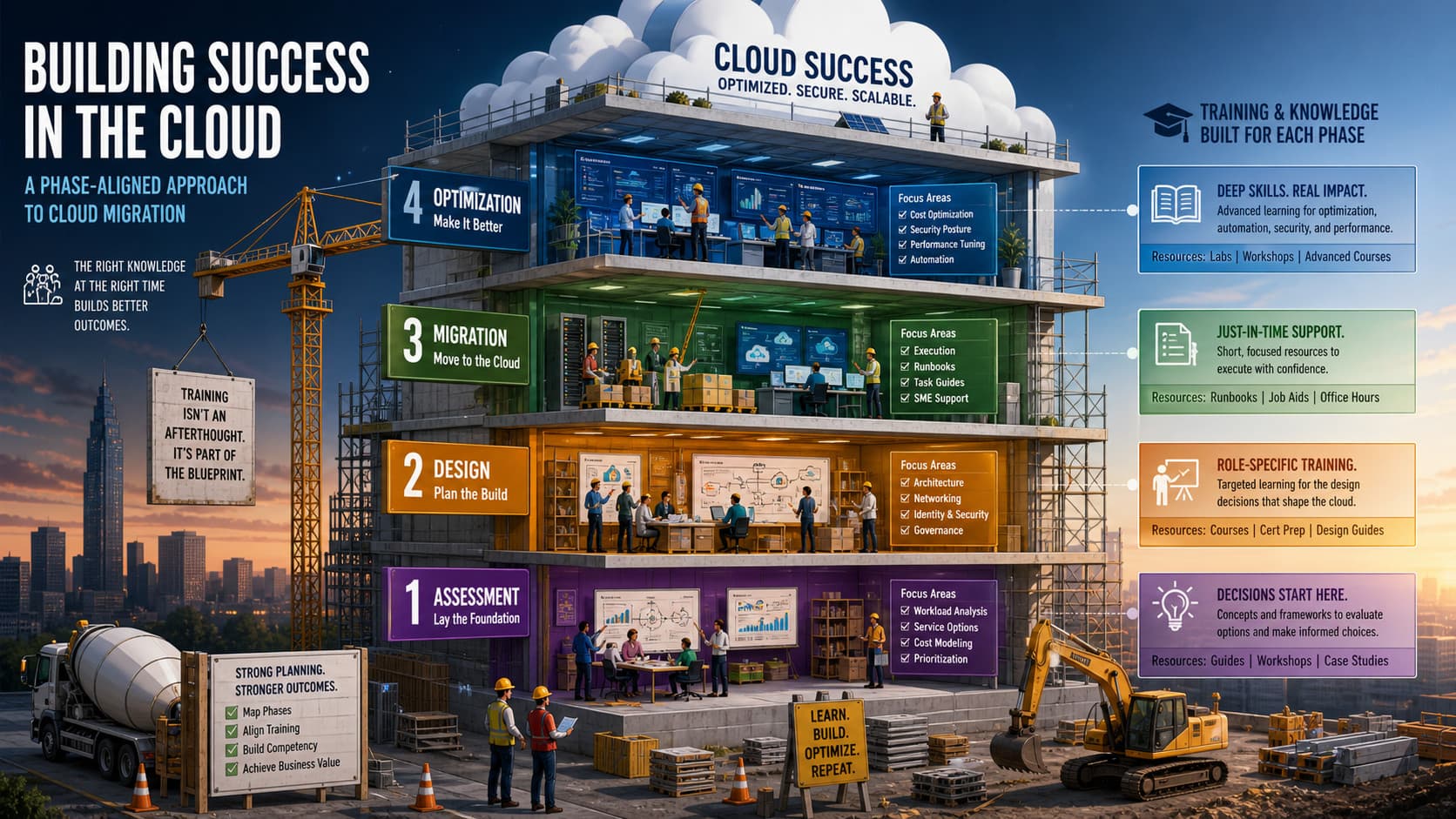
A cloud migration typically moves through four stages: assessment, design, migration, and optimization. The knowledge requirements shift at each stage, and so should the training.
During assessment, the team needs enough conceptual grounding to evaluate options. They are not yet operating cloud tools. They are making decisions about which workloads to move, in what order, and to which services. Training at this stage should focus on service selection, cost modeling, and architectural trade-offs. The goal is informed decision-making, not hands-on configuration.
During design, the scope narrows. Architects are building network topologies, identity frameworks, and governance structures. Training needs to go deep on specific services and patterns relevant to the chosen architecture. This is where vendor-specific certification content starts to earn its place, but only when scoped to the decisions already on the table.
During migration, the team is executing. Training at this point should be minimal and reference-focused: runbooks, short task-specific guides, access to SMEs who can answer questions in context. Trying to run full training courses while migration is in progress adds load to an already stressed team and usually fails to land.
During optimization, after workloads are running in the cloud, the team can absorb more. This is the right moment for deeper content on cost optimization, security posture, performance tuning, and automation. Attention is available. The environment is stable. The team has real context from what they just built.
The Cost of Each Approach
Training everything upfront has one clear benefit: people enter the migration with baseline competency. The cost is that much of what they learn does not connect to anything they are doing yet. Knowledge fades when it is not applied, and a team trained in month one may retain little of it by month three when the relevant phase arrives.
Training after go-live keeps the project moving but transfers risk onto the team. When an engineer configures a service incorrectly because they have not learned the security defaults, that is a training failure that was built into the schedule. The costs show up as rework, incidents, and delayed timelines.
Training nothing and relying on vendor documentation is cheaper in the short term and expensive everywhere else. Documentation assumes a level of prior knowledge most teams do not have. It also does not teach judgment, only syntax.
Phase-aligned training is more complex to design and manage. It requires a training plan before the migration starts, buy-in from project leadership to treat learning as a parallel workstream rather than a deliverable, and someone responsible for matching content to project milestones. Most organizations skip this because it requires upfront planning effort. That effort is much smaller than the recovery effort after a poorly supported migration.
Build the Plan Before the Project Starts
Before the migration kicks off, map the four phases to your specific project timeline. Identify which roles are active in each phase and what decisions they will be making. Then assign training content to phases, not to a calendar slot at the end of the project.
For each phase, pick a small number of specific learning objectives. Not topics. Objectives. "Understand cloud storage options" is a topic. "Select the right storage tier for three categories of workloads in our environment" is an objective. The difference matters because it gives you something to test and because it forces the training content to connect to actual decisions the team will face.
Run a short feedback loop at the end of each phase. Ask the team what they needed to know that they did not know. Use those answers to adjust the training for the next phase. You will catch gaps faster than any pre-migration assessment will predict them.
The teams that come out of cloud migrations with stronger capabilities managed learning the same way they managed networking or security: as a workstream with its own milestones, dependencies, and checkpoints. That is what keeps training off the last-minute checklist and puts it where the migration can actually rely on it.