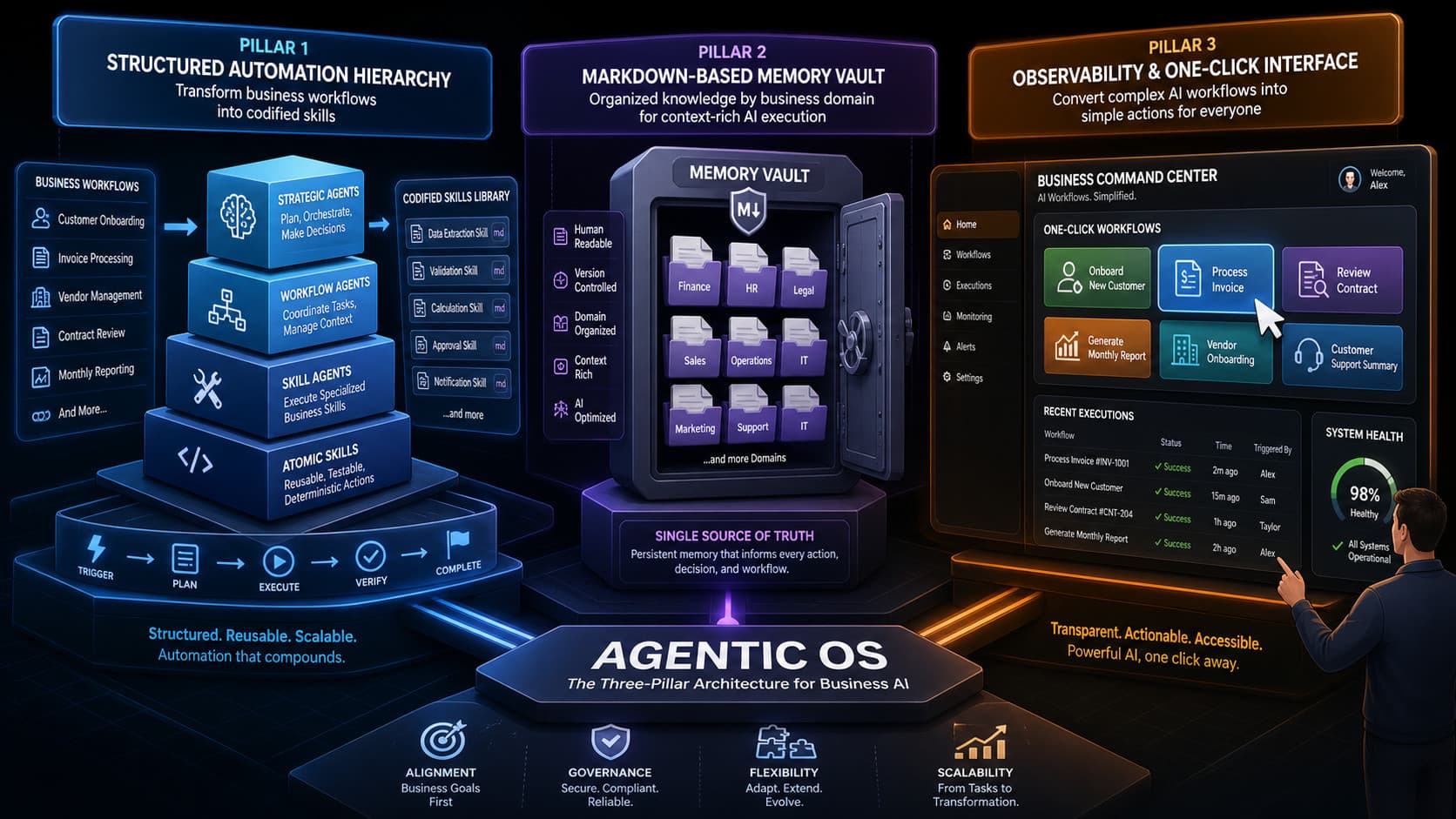
The architecture described in this article is model-agnostic. It applies to whichever AI model you or your organization uses: Claude (claude.md), Codex (agent.md), or any other. The pattern is the same regardless of which model sits at the execution layer.
A technical founder opens Claude, types a question about a sales lead, gets a decent answer, and closes the tab. The next day he opens it again, types a slightly different version of the same question, and gets a slightly different answer. Three months in, he has learned nothing about the lead, built nothing repeatable, and has no record of what worked. He is using a language model the same way he uses a search engine, and he is wondering why it does not feel like leverage.
The problem is not the model. The problem is the missing layer between intent and execution.
The Slot Machine Problem
Most AI usage follows a pattern that does not scale. User types a prompt. Model returns a response. User uses it or ignores it. Nothing is tracked. Nothing is stored. Nothing feeds back into the next session.
This is the slot machine model of AI interaction. Pull the lever, get a result, hope it is useful. It produces inconsistent output, no institutional memory, and zero compounding value over time. Every session starts from scratch.
The gap this creates is not a model quality problem. GPT-4, Claude, Gemini, they are all capable enough. The gap is architectural. There is no system managing what the AI knows about your business, how it should behave, or what it has already done.
An Agentic OS closes that gap. Not a vendor product. A design pattern you build yourself.
What an Agentic OS Actually Is
A traditional operating system manages hardware. It allocates memory, schedules processes, controls access to CPU and disk. An Agentic OS manages something different: intent and intelligence. It is the management layer that sits between your business logic and the AI models you use to execute it.
The practical definition is simpler than it sounds. An Agentic OS is a structured combination of three things: an architecture that breaks your workflows into repeatable, codified skills; a memory layer that persists context across sessions without burning tokens unnecessarily; and an observability layer that makes the system usable by people who will never open a terminal.
Without architecture, your AI use is ad hoc. Without memory, every session is stateless. Without observability, only you can operate it, which limits how much it can actually do.
Those three components separate operators who use AI as a tool from operators who use it as a system.
Architecture: From Workflows to Skills
The starting point is a stream-of-consciousness audit. Open a terminal, connect a voice-to-text input, and explain your day to the model. Walk through what you actually do: prospecting tasks, content operations, research routines, client communication workflows. The model helps you identify the domains (Research, Sales, Content, Memory) and the discrete tasks inside each one.
A domain is a business area. A task is a specific thing you do inside that area. A skill is that task, codified: a precise prompt template with defined inputs, expected outputs, and clear behavior rules. Once a task becomes a skill, it executes the same way every time.
The progression matters. Workflows become tasks. Tasks become skills. Skills become automations. Automations compose into architecture. Each step removes a decision point from the execution path. Instead of figuring out how to research a prospect every time, you run the prospect research skill, which calls the relevant sources, formats the output consistently, and drops it into the right folder.
Some skills stay interactive. Others become headless automations that run on a schedule or a trigger. The distinction depends on how much human judgment the task actually requires. Automating a morning trend scan requires no human in the loop. Deciding what to do with the results often does.
Memory: Structured Markdown Over Vector Bloat
The memory layer is where most builders overcomplicate things. The instinct is to reach for vector databases, embeddings pipelines, and RAG infrastructure. For the vast majority of solo builders and small teams, this is the wrong direction. It adds operational overhead without solving the core problem.
The core problem is context retrieval at low token cost. A well-organized folder of Markdown files solves this for almost every real use case.
Markdown works because it is simultaneously human-readable and machine-readable. The model can navigate a structured Markdown directory, pull the relevant files for a given task, and reason over them without loading everything into context. This keeps inference costs down and response quality up. You can read, edit, and audit the memory yourself without specialized tooling.
The folder structure matters. The Andrej Karpathy Raw/Wiki/Output template is a reasonable starting point, but it is generic. A structure organized by your actual business domains (one folder per domain, with subfolders for active projects, reference material, and completed work) performs better in practice. The model finds what it needs faster, and the structure reflects how you actually think about your work.
claude.md file, sometimes called a system prompt file. This file tells the model what it is doing, who it is working for, how the memory is organized, and what rules govern its behavior. Without it, every session requires re-orienting the model. With it, the model picks up context immediately and operates within defined constraints from the first message.claude.md is not a one-time setup task. It evolves as your skills and workflows evolve. Treat it as living documentation of your system's current operating logic.Observability: Buttons, Not Terminals
Architecture and memory handle the back end. Observability handles everything else, including whether anyone other than you can use the system.
The terminal is not a user interface for most people on a team. Clients will not learn bash. Account managers will not write prompts from scratch. If the only way to run a skill is to type a command, the system's reach stops at the person who built it.
The observability layer solves this with a dashboard interface. Every skill that gets used more than a few times a week should become a button. Not a command, not a prompt template to copy and paste. A single click that runs the skill, captures the output, and logs the execution.
Non-technical team members can run a prospect research routine, generate a client report, or trigger a content summary without knowing what is happening under the hood. The skill executes consistently regardless of who runs it.
Observability also provides operational visibility. A well-built dashboard shows which skills are running, how often, when memory files were last updated, and where the system is hitting usage constraints. This is the difference between a system you trust and a black box you hope is working.
Three Steps to Get Started
The implementation path has three phases, each building on the previous one.
Phase one is the audit. Before you build anything, spend an hour talking to the model about your work. Describe your daily tasks, your recurring workflows, your repeatable decisions. The model will surface the domains and the candidate skills. Write them down. This is your architecture map.
claude.md file. Start with the five or six skills you use most often and codify each one: clear input format, expected output, behavior rules. Run them for two weeks and refine based on what actually breaks.Phase three is the dashboard. Identify the three to five skills that get used most frequently or that other people need to run. Build a simple interface around them. This does not need to be sophisticated. A local HTML file with buttons that trigger predefined prompts is enough to start. The goal is removing the terminal as a prerequisite for using the system.
The Compounding Advantage
This architecture does not pay off in any single session. It pays off over time.
Every skill you codify is a decision you stop re-making. Every domain folder you build is institutional memory that survives the end of a session. Every automation you deploy is capacity that runs without your attention. The system becomes more capable as you add to it, not just more complex.
Solo builders and small teams that reach this stage can do something more interesting: package and transfer the system. A codified skill set can be handed to a new team member with minimal ramp time. A client-facing dashboard can give non-technical stakeholders direct access to AI-powered workflows without exposing the underlying infrastructure.
Building the architecture first is the move. The memory layer compounds on top of it. The dashboard makes it real for the people around you. The model is the execution engine. What you build around it determines whether any of this scales past one person with a terminal.